Modernizing Flo, Morf's AI Agent
A case study on overhauling a poor healthcare agent experience into an excellent one.
Company
Morf Health
Role
Founding Design Engineer
Timeline
2 weeks
Launch
2026
Rebuilding Flo
Background
Morf is a healthcare workflow automation platform. Customers (mostly operations teams at digital health companies) use it to connect EHRs, form builders, and communication tools into automated patient workflows. Think: “When a patient books an appointment in Healthie, send them an SMS via Twilio and create a task in the CRM.”
Flo is Morf’s in-product AI assistant. It lives in app and helps users build and configure these workflows through natural conversation. Flo can search documentation, create workflows, add and configure nodes, look up integration details, and generate expressions that power Morf’s workflow logic.
The Problem
Flo had the bones of something useful but the experience was rough. A few specific issues:
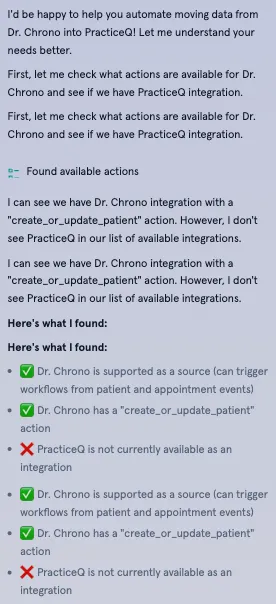
Noisy conversations. Every internal tool call rendered as a visible message in the chat. A simple request like “add an SMS node” would produce a wall of intermediary “Searching for actions…” / “Looking up Twilio…” / “Fetching workflow version…” messages before the actual response. In short, too much sausage-making exposed to the user.
No structured input. When Flo needed information from the user (which EHR do you use? what should trigger this workflow? what message should the SMS contain?), it asked questions one at a time in plain text. Configuring a workflow with 4-5 required inputs meant 4-5 round trips of back-and-forth messaging. Slow, tedious, and easy to lose context.
No safety guardrails. Flo could create workflows and modify nodes without any confirmation step. A misunderstood request could result in unwanted changes to a production workflow with no undo path. Users had to trust that the AI understood them perfectly on the first try.
Walls of text. Responses were long and meandering. Flo would narrate its own tool usage (“Let me search for that…”), repeat context the user already knew, and produce paragraphs where a sentence would do. The conversational style felt too chatty and users just skipped the text anyway.
No documentation grounding. When Flo didn’t know something, it would hallucinate features or configurations rather than admitting uncertainty. There was no citation system and no connection to Morf’s docs, so users couldn’t verify answers.
An example of a noisy chat:
Scoping
I started with a full audit of the existing implementation: the system prompt, the streaming pipeline, the message rendering components, and the MCP (Model Context Protocol) server that exposed Morf’s tools to the LLM. The codebase was functional but had grown organically (and quickly) without any grounding in good user experience.
The core insight was that most of Flo’s UX problems weren’t code problems - they were prompting problems. The system prompt had minimal guidance on communication style, no protocols for structured interactions, and no rules about when to show or hide work. The frontend faithfully rendered everything the model produced, which meant the model’s bad habits became the user’s bad experience.
I scoped the work into two tracks: AI experience design (how the model should behave, enforced through prompting) and frontend architecture (new components and patterns to support those behaviors). The two were closely connected each prompting protocol needed a corresponding UI pattern to land correctly.
AI Experience & Prompting
This was the core of the project. I redesigned Flo’s system prompt from scratch, treating it as a product design artifact. Each section of the prompt maps directly to a user experience improvement.
Communication Style
The most impactful change ended up being the simplest. I added explicit directives at the top of the system prompt:
- Be concise: 1-3 sentences per response when possible
- Be direct: Get to the point immediately, no pleasantries or filler
- Skip obvious context: Don’t repeat what the user already knows
- Do not narrate tool usage: The activity indicator already shows this to the user
I included concrete good/bad examples directly in the prompt:
Bad: “Great question! I’d be happy to help you with that. Let me explain how workflows work in Morf. First, you need to understand that…”
Good: “For SMS reminders, you’ll need: 1) Appointment trigger, 2) Twilio action. Want me to set this up?”
The “do not narrate” rule was particularly important. Before, Flo would say “Let me search for that action…” and then execute the search tool. After, it executes silently and the UI shows a subtle activity indicator. The resulting experience is a chat that reads like a conversation with a knowledgeable colleague, not an AI play-by-play. Users get enough of that in their other AI-enabled apps!
Plan + Confirm Protocol
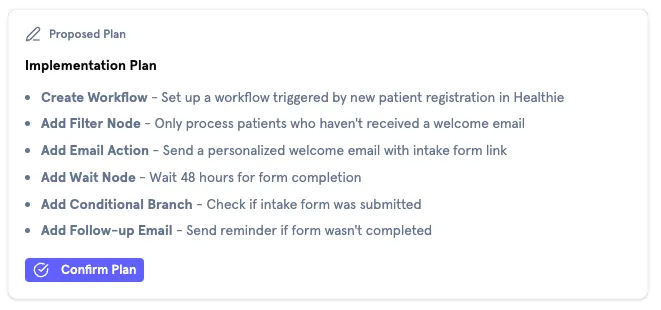
For any state-changing operation (creating workflows, adding nodes, modifying configurations), I introduced a mandatory planning step. The prompt instructs Flo to:
- Output a
<plan>block describing exactly what it’s about to do - Wait for explicit user confirmation before executing any tools
Read-only operations (listing actions, searching docs, looking up properties) execute immediately without a plan to keep the chat running smoothly. This distinction maps to a simple mental model: looking things up is free, changing things requires approval.
To keep things looking nice, the <plan> tag is intercepted mid-stream and converted into a component, making the resulting experience quite clean. In the time before the plan is finished and the stream is still ongoing, Flo outputs a “preparing your plan” status to keep the user aware of system status at all times.
Questions Protocol
Users frequently had long back and forths with Flo that required lots of follow ups and confirmations. With network delay and LLM response generation time, this caused lots of user dropoff, as simple exchanges could take minutes.
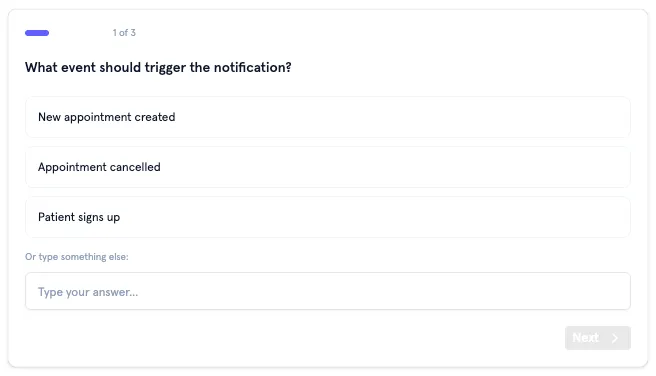
To combat this, instead of asking questions one at a time, I designed a <questions> protocol where Flo outputs a JSON block describing a batch of related questions. The frontend parses this and renders a stepped form with progress indication, back/forward navigation, and a review step before submission.
I defined four question types:
- Single-select: Radio buttons with auto-advance on selection. Think “Do you want to send an SMS or an email?”
- Multi-select: Checkboxes for “select all that apply” scenarios. More along the lines of “What should happen after the email is sent?”
- Text: Free-form input
- Integration-select: A searchable combobox filtered by category (EHR, CRM, communications, etc.), pre-populated with Morf’s full integration catalog. This was to help ground the model and prevent hallucinating capabilities or integrations Morf didn’t have.
The prompt also accounts for existing context: if the organization already has integrations configured, Flo acknowledges those (“It looks like you have Healthie and Twilio set up”) rather than asking from scratch. This required injecting the org’s configured integrations into the system prompt dynamically.
Verification Rules
A recurring problem was Flo guessing at property names, IDs, or field paths and getting them wrong. We had an MCP server that could validate these, but it was only being called some of the time. I added strict verification rules:
- If unsure of a patient property name, must call
list_patient_propertiesfirst - If unsure of an action’s parameters, must call
get_action_detailsfirst - If unsure of event payload structure, must call
get_event_payload_detailsfirst - Never guess — always verify
This trades a small amount of latency (one extra tool call) for significantly more reliable outputs.
Extended Thinking
Flo is based on Sonnet, so I also enabled Claude’s Extended Thinking feature with a 4,000-token budget. This gives the model space to reason through complex requests, and seemed to work well when A/B testing responses with/without ET enabled.
Documentation Grounding
Flo sometimes ran into questions that were too thorny to think through without referencing docs, or would hit deadends in reasoning. Most of the time, it would just make up an answer (not ideal).
I connected Flo to Morf’s documentation via a Mintlify MCP server and added an explicit “I Don’t Know” policy to the prompt. When a documentation search returns no relevant results, Flo must either ask clarifying questions, admit it doesn’t have information on the topic, or suggest contacting support. This effectively elimnated hallucinations in our testing.
As an aside, when docs were found, they would render as citatations below a given answer, helping build user trust.
Activity Hiding
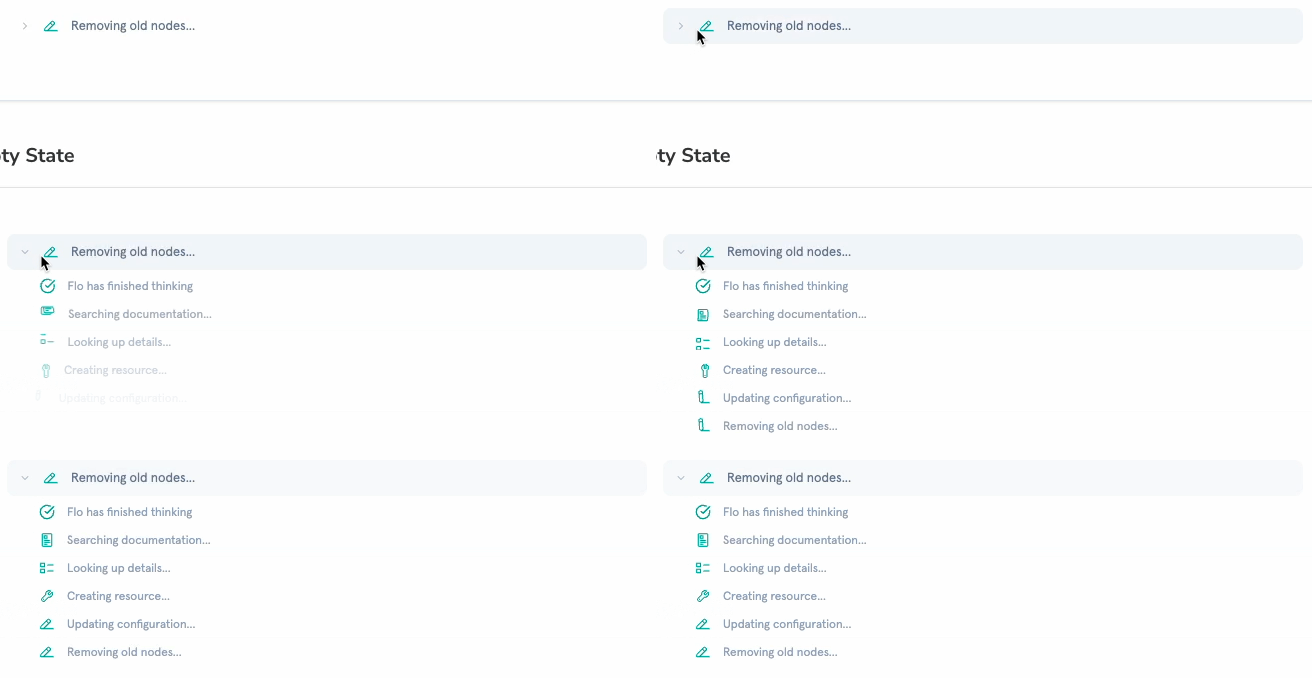
I categorized every tool into silent (internal lookups) or public (state changes). Silent tools, like get_action_details, list_actions, list_workflows, and similar read-only operations, render as a single collapsible “Flo is thinking…” indicator with a subtle animation. Public tools, like create_workflow, add_workflow_nodes, configuration updates, render with descriptive text, action-specific icons, and links to the affected resources.
When multiple silent tools execute in sequence (which happens frequently), they collapse into a single activity indicator with expandable steps. Each step shows its status: running, completed, or errored. The result is that a request triggering five internal lookups appears as one brief “thinking” moment rather than five noisy messages.
Technical Notes
Block Parsing During Streaming
The plan and questions features both rely on custom XML (ish) tags (<plan>, <questions>) embedded in the streamed response. Parsing these during an active SSE stream is tricky — you need to detect incomplete blocks (the opening tag has arrived but the closing tag hasn’t yet) and handle them cleanly.
I built a generic block parser that handles both complete and streaming states. It detects whether a block is still being written and returns an isStreaming flag so the UI can show appropriate loading states. For questions blocks, the parser JSON-parses the content once complete; for plan blocks, it extracts raw markdown. Both parsers are composed from a single generic parseBlock() utility with a type-specific parser callback, so it works both ways.
Learnings & Takeaways
System prompts are product design. The biggest UX improvements in this project came from rewriting the system prompt, not the frontend code. Telling the model to be concise, not narrate its tool usage, and follow specific interaction protocols had more impact on the user experience than any component redesign. Treating prompt engineering as a design discipline, with rigor around user testing and iteration, was the right call.
Structured output protocols help AI UI work nicer. The <plan> and <questions> tag conventions gave the model a way to express structured intent that the frontend could render as rich UI. Establishing a handshake between the frontend and LLM in this way made everything easier. The model decides what to present; the frontend decides how to present it.
Categorize, don’t filter. My first instinct was to simply hide all tool calls from users, and hide system status behind a generic “Thinking…” tag. Testing this internally revealed some issues though, mainly, users felt like Flo wasn’t doing anything. The silent/public categorization was a better approach, with internal lookups hidden behind a thinking indicator (because users don’t care about them), while state-changing operations showed clear descriptions (because users need to understand what happened). The distinction maps to a real mental model, not an arbitrary visibility rule.